Optimizing ABA Billing in Lumenality: Rule-Based Scrubbing, Stedi, and Where AI Fits
Lumenality optimizes ABA billing with rules and a built-in clearinghouse, not with AI. The session note becomes the claim line, rule-based checks run before every claim goes out, and Stedi tracks acknowledgments, claim status and 835 payments. AI features are optional, off by default and switched on only by the practice's admin.
Why is ABA billing easy to get wrong?
ABA billing is easy to get wrong because every session becomes time-based units that must match a code, an authorization and a note. The ABA codes, 97151 through 97158, are billed in 15-minute units, according to CMS's Medicaid ABA toolkit. Payers cap units through authorizations and set their own rules on modifiers and provider levels. Some Medicaid programs add Electronic Visit Verification (EVV) requirements on top.
Small errors send claims back unpaid. A missing modifier, an expired authorization or a unit count that differs from the note can each trigger a denial. Each denial arrives on an 835 with an X12 claim adjustment reason code explaining why the payer paid differently than billed. The best place to catch those errors is before the claim leaves your system.
How does a session note become a claim in Lumenality?
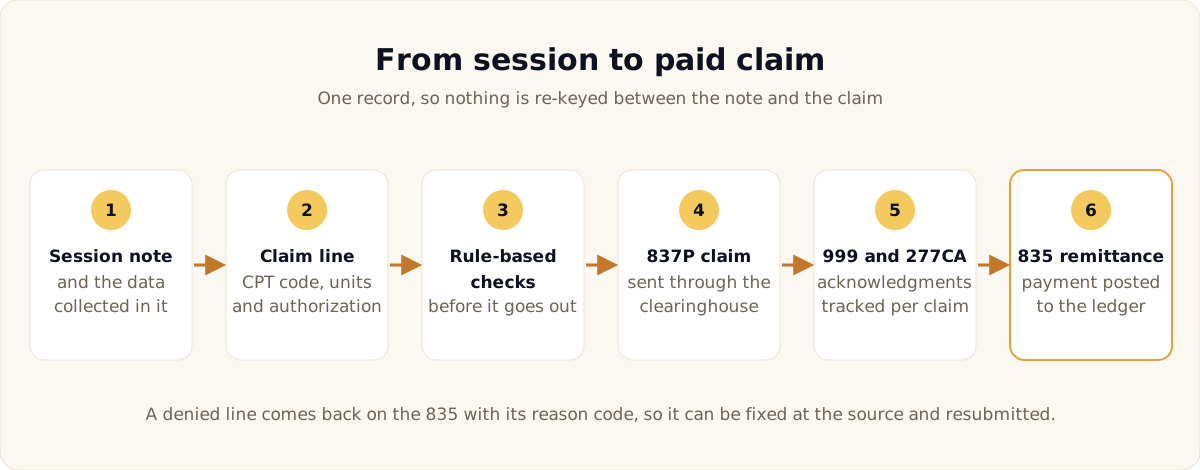
In Lumenality, the signed session note and its data become the claim line. The CPT code, units and authorization come from the same record, so no one retypes session details into a second system. Re-entry is where dates, unit counts and providers tend to drift apart.
Authorizations live in the same record and draw down by CPT code per session. A warning appears at 80 percent of units used, and authorizations about to expire are flagged before the dates lapse. The team learns about a lapsing authorization from a flag, not from a denial. Our guide to mastering prior authorizations covers the request and reauthorization side.
What do the rule-based checks do?
The rule-based checks hold or flag a claim before submission, so problems get fixed before a payer sees them. Every claim is checked against a set of billing rules and given a denial-risk score. The outcome is simple to act on:
- A blocking issue stops the claim. The claim does not go out until the problem is fixed.
- A warning flags the claim for review. Your biller reviews the flag and decides what to do.
Claim scrubbing is rule-based, so a held or flagged claim points to a specific rule your team can read and correct. The same rules run on every claim, which keeps the results consistent from one biller to the next. A billing administrator can override a block when the situation calls for it, and the override is recorded in the audit trail.
Alongside the pre-submission checks, a nightly rule-based sweep looks for likely duplicate claims and coordination-of-benefits problems. Anything it finds is flagged for review, so a double-billed session gets caught before it becomes a payer problem. When a denial does get through, our guide to ABA denial management explains how to read the codes and fix the cause.
What does the built-in Stedi connection handle?
The Stedi connection handles the standard electronic transactions a practice exchanges with payers. CMS lists the adopted HIPAA transaction standards, including the 837 for claims, 270/271 for eligibility, 276/277 for claim status and 835 for remittance advice. In Lumenality, each one has a place in the workflow:
- Eligibility first. Real-time eligibility and benefits checks (270/271) run before a client is seen.
- Claims with acknowledgments. Claims go out as 837P, and the 999 and 277CA acknowledgments are tracked on each claim.
- Claim status on demand. Claim status checks (276/277) show where a claim stands from inside Lumenality.
- Payments that post themselves. 835 remittances post payments to the right claims automatically, which cuts manual posting.
- Enrollment with your team. Clearinghouse enrollment with each payer is handled together with the practice.
Acknowledgments matter because a front-end rejection is not a denial. A rejected claim never entered the payer's system, so it needs a fix and a new submission, not an appeal. Claims can still be produced as standard 837 files or a CMS-1500 when a payer needs them. Read more about why Lumenality uses Stedi.
How does EVV fit into billing?
EVV fits in as a gate before the claim goes out. Federal law requires states to use EVV for Medicaid personal care and home health services, as Medicaid.gov explains. The CMS ABA toolkit adds that states should consider extending EVV to home-based ABA. EVV rules are set per program and state.
In Lumenality, the EVV visit is captured when the note is signed. Visits that need attention go to an exception queue. A claim gate keeps EVV-required claims from being sent while visit exceptions are unresolved.
Where does AI fit today?
AI fits only where a practice's admin turns it on. Every AI feature in Lumenality is optional and off by default. The admin controls the features from the AI settings hub, which has a master switch, per-feature switches and an emergency off switch. The hub also sets cost and budget limits and shows an AI-assistance disclosure.
The optional features run on Google Gemini. Two examples show the approach:
- Reading incoming intake documents. When enabled, AI can read incoming fax and email intake documents into the intake queue. Anything it cannot read goes to manual review.
- Explaining schedule suggestions. The Schedule Planner's suggested staff and client pairings come from a deterministic matcher. AI only explains the reasoning, and staff review the suggestions before applying them.
Claim scrubbing is not one of the AI features. The checks that hold or flag a claim are rules, and they run the same way whether AI features are on or off. Billing decisions stay with your team and with rules it can read.
What does a steadier revenue cycle take?
A steadier revenue cycle takes a chain of small safeguards rather than a single feature. Verify eligibility before the session, track authorization units, and document once. Check every claim against clear rules, watch acknowledgments and claim status, and post remittances accurately. Lumenality keeps that chain on one ABA-only platform, where each practice runs on its own single-tenant deployment with its own database and encryption keys.
Pricing is one flat monthly rate per practice by provider count, with plans starting at $599 a month for Solo. Every tier's rate is on the pricing page. Clearinghouse and AI usage are billed at agreed-to rates, with no per-seat charges, no setup fees and no percentage of collections. Long-term contract pricing is available.
If you'd like to see how this works with your payers and workflows, we'd be glad to walk you through it. Request a demo whenever you're ready.
*This article was created with AI assistance and reviewed by the Lumenality team.*